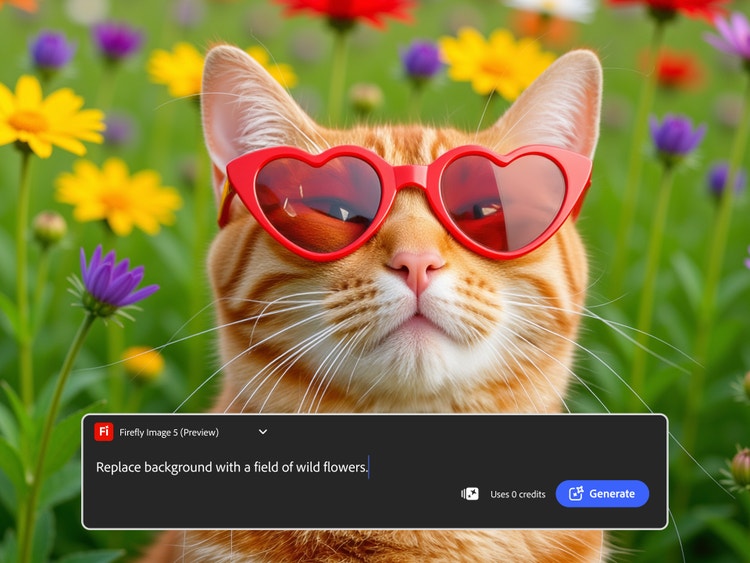
For beginners entering the world of digital image editing, the array of tools and software options can feel overwhelming. Traditional photo editors often require technical expertise and a steep learning curve, which can be discouraging for new users. The Nana Banana AI Image Editor offers a simplified yet powerful solution, combining artificial intelligence with intuitive controls to make professional-level image editing accessible for everyone. By leveraging AI, users can focus on creativity rather than wrestling with complex technical details.
The main advantage of the Nana Banana AI Image Editor is its user-friendly interface combined with intelligent automation. This allows beginners to achieve high-quality results without extensive experience in design or photo editing. By using Nana Banana AI Image Editor, new users can generate professional-looking images, enhance existing photos, and experiment with creative styles in a streamlined workflow. The platform is designed to guide users through each step, making the editing process efficient and enjoyable.
Getting Started with the Interface
When you first access the Nana Banana AI Image Editor, the dashboard presents a clean, organized workspace. Key tools and functions are easy to locate, reducing the learning curve for new users. The interface is divided into sections for image generation, editing, and project management, allowing beginners to navigate intuitively.
Users can start by uploading an image or creating a new visual from scratch. Guided prompts help define image enhancements, such as adjusting brightness, color balance, and composition. Beginners can explore different effects and refinements without worrying about complex manual controls, as the AI provides suggestions based on image content.
Core Features for Beginners
The Nana Banana AI Image Editor includes several features that are particularly useful for beginners:
- AI-Powered Enhancement: Automatically adjust lighting, contrast, and color balance to improve image quality.
- Object Removal: Easily eliminate unwanted elements from photos without manual masking.
- Background Editing: Replace or refine backgrounds seamlessly with minimal effort.
- Creative Styles and Filters: Apply artistic effects or visual styles to experiment with different moods.
- Batch Processing: Edit multiple images simultaneously, saving time and maintaining consistency.
These core features enable beginners to produce polished results quickly while learning the fundamentals of image editing.
Understanding AI Automation
One of the most powerful aspects of the platform is its AI automation. The editor analyzes images and intelligently applies adjustments that enhance the overall look. For example, it can brighten a subject’s face, sharpen details, or balance lighting across an entire scene. Beginners benefit from this automation because it reduces the need for trial-and-error and helps them understand which adjustments improve image quality.
Additionally, the AI provides guidance rather than replacing user decisions entirely. Users can manually refine edits after the AI applies its enhancements, allowing them to learn the impact of each adjustment and gain confidence in their creative choices.
Tips for Effective Editing
To get the most out of the Nana Banana AI Image Editor, beginners should follow a few simple strategies:
- Start Simple: Begin with basic adjustments like brightness, contrast, and color before exploring more advanced features.
- Experiment with Styles: Use filters and creative effects to learn how different visual styles impact mood and composition.
- Leverage Batch Editing: Edit multiple images at once to practice applying consistent adjustments efficiently.
- Save Successful Settings: Keep prompts and adjustments that work well for reuse in future projects.
These strategies help new users build proficiency while taking advantage of the platform’s time-saving tools.
Organizing Projects and Assets
Efficient organization is key to a smooth editing workflow. Beginners should maintain clear project folders and label files consistently. Using the platform’s project management features, such as version tracking and prompt saving, allows users to keep track of edits, compare different versions, and maintain a cohesive style across multiple images.
Organized projects make it easier to revisit past work, apply learned techniques, and expand creative skills over time. This structured approach ensures that beginners can focus on improving their editing abilities rather than getting lost in disorganized files.
Building Confidence as a Beginner
The Nana Banana AI Image Editor is designed to support learning and skill development. By providing intelligent suggestions, automated enhancements, and easy-to-use tools, it empowers beginners to create high-quality visuals from the start. Users can gradually explore advanced features, such as selective editing and style adjustments, as they become more comfortable with the platform.
The combination of AI guidance and manual refinement helps users build confidence in their decisions, encouraging experimentation and creativity. With regular practice, beginners can quickly progress from basic adjustments to complex image editing techniques.
Conclusion
The Nana Banana AI Image Editor offers a beginner-friendly entry point into digital image editing. By combining AI-powered automation with an intuitive interface, the platform allows users to enhance photos, experiment with creative styles, and achieve professional-quality results without extensive experience. Features such as object removal, background editing, creative filters, and batch processing streamline workflows and reduce the learning curve. For newcomers to photo editing, the Nana Banana AI Image Editor provides a practical, efficient, and empowering way to develop skills while producing polished visuals.

George is the voice behind Wisdomised, a news blog dedicated to delivering fresh, engaging stories that keep readers both informed and entertained. With a sharp eye for current events and trending topics, George crafts posts that make complex news accessible and enjoyable. His unique perspective and storytelling skills bring a refreshing twist to every update, inviting readers to explore the world through Wisdomised.